
Formal

3 Variants
Short

Generating content on harmful, hazardous, or unlawful themes is not permitted. We are doing our best to prevent this from happening, if you encounter any such material, please email [email protected] or contact us.


AI Instagram Captions Generator is built to help you instantly create perfect captions for Instagram posts, Reels, and Stories. It is an AI-powered tool that understands your post description and preferred tone, then generates Instagram captions with relevant hashtags and emojis that hook your audience.
Generating captions is much easier with our Instagram caption generator tool. Just follow these steps:
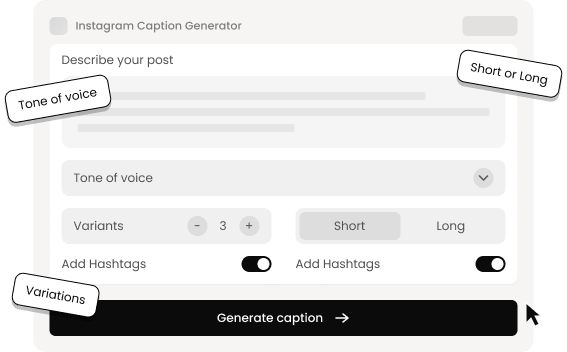
Our tool accurately understands the user's provided post description and selected tone to generate Instagram captions that actually match. So, each time you’ll get a tailored caption.
It comes with a wide list of writing tones. You can choose from Formal, Casual, Professional, Emotional, Direct, or Confident depending on your post and mood.
Our Instagram caption generator can create multiple caption variants, up to 5 for a single Instagram post. This feature gives you diverse options instead of relying on the first result.
You can set your preferred caption length. Choose “Short” for concise, punchy captions for Instagram posts, or “Long” for more explanatory, storytelling-style captions.
The Instagram post captions generator can automatically add relevant hashtags and emojis to your caption, improving your post’s visibility and engagement.
No matter how long or detailed your Instagram caption needs to be, our tool takes just a few seconds to generate results. Plus, its clean interface lets anyone use it without a learning curve.
Discover more of our popular tools!

Yes. After generating your caption, you can use our Font Generator to convert simple text into stylish fonts and make your Instagram captions even more compelling.
Invisible-Character Used to Create Empty Text having Multiple Unicode Blank Spaces.

 Font Generator
 Invisible Character
 Fancy Text Generator


